
Although starting an online business has become simple, there are still many factors that you need to consider in order to achieve the desired success. Some of these factors include a professional design, fast-loading speed, and a smooth payment gateway. If you are constantly searching for how to set up your Shopify store on search engines, then you have come to the right place. In this article, we will guide you through all the steps of creating a reliable and responsive online store with Shopify. By the end of this article, you will be able to begin selling online and start earning revenue.
What Makes Shopify The Ideal Platform To Create An Online Store?
Among all the other platforms that are used to create an online store, Shopify proves to be the best one for both beginners as well as professionals. This is primarily because of its user-friendly interface, scalable options, and the ability to start selling online in the shortest possible time. The best part? Shopify does not even require you to have a good hand for coding. Aside from this, there are also several other reasons for creating an online store with Shopify, such as the ones we have listed below.
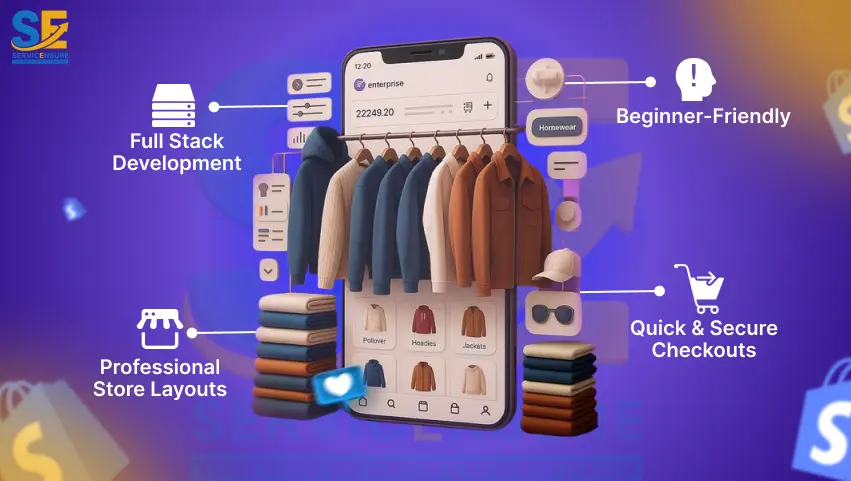
- Full-Stack Platform: There is no need to manually manage hosting, plugins, or even security.
- Professional Store Layouts: Shopify offers a multitude of professional store designs, and even the free ones are also highly converting.
- Beginner-Friendly: All the customization for your store can be done with simple drag-and-drop.
- Quick & Secure Checkouts: Shopify is streamlined for mobile checkouts and loyal clientele.
- Scalable: You can easily adjust the scale of your Shopify store as your business grows.
How To Build Shopify Store From Scratch?
Although the process of setting up a Shopify store can be extremely lengthy, you can simply follow the steps we have listed below to have a hurdle-free time when creating an online store with Shopify.
1. Create Your Shopify Account & Choose a Plan
First things first, you will need to visit Shopify’s official website and register your email, along with some other basic information such as your name and birthdate. Once that is done, you can visit the Pricing page of Shopify and select from Basic, Grow, Advance, and Plus.
Although the basic plan is usually the sweet spot for new businesses, you can select a higher plan if you feel the Basic one is lacking in certain areas. After you have finalized a plan, you can simply go ahead and purchase it.
2. Basic Store Settings
Once your plan is active, the next step for how to set up your Shopify store is to establish your store’s identity. Establishing the identity of your store is highly essential as it will have a direct impact on brand recognition, identity verification, search engine visibility, and even legal registration. This is also one of the core aspects that many Shopify store design services prioritize.
For the basic store settings, you can follow the steps we have listed below.
- Go to Settings, then Store Details.
- Establish business name, address, and contacts.
- Select currency, language, and time zone.
- Add staff accounts for easy collaborations.
3. Choose Your Theme
Although a default theme is already set up when you create a Shopify account, you can always change it via the Shopify themes page. As Shopify also has a variety of free themes, you can easily find one that looks clean and attractive. Once you have found a theme, you can simply click on the add button. This will directly add the theme to your Shopify themes library. From there, you can easily install it in your store. Do note that although most themes have their own navigation system, you can easily customise them according to your requirements.
4. Add Your Products
Now, it is time to build a catalogue for your products. For this purpose, you can follow the step-by-step process we have mentioned below.
- Open the Shopify Admin panel, and click on Products from the left menu.
- Then click on the Add Product button.
- Give your product a clear title and description.
- Drag-and-drop the images and videos of your product in the Showcase tab.
- Next, add the pricing for your product.
- Lastly, add the product’s weight for shipping calculations.
In order to build your Shopify store, you will need to follow the exact mentioned above steps for all your products. Once your products have been added to the page, you can then follow the next step for how to build Shopify store from scratch.
5. Set Up Payment, Taxes, and Shipping Information
In order to receive payments, you need to activate Shopify Payments or a third-party payment gateway based on your location. Select automatic payment capture options or manual payment capture options in case you would like to verify orders before charging.
“Pro Tip: Install a Fraud Filter from Shopify’s store to identify and block potential fraudsters.”
Once you have established your payment gateway, you can then set shipping zones and rates based on your intended delivery destinations. For this, you can follow the steps we have mentioned below.
- Navigate to Settings and go to Shipping and Delivery.
- This will take you to the shipping profile; here, you can click on Manage.
- In this section, create new zones for the different countries or regions you want to ship to.
- Now, select the countries and regions you want to include in your shipping zones.
- Once you have selected your shipping zones, you can click on Done and then Save.
6. Add Essential Pages & Checkout Settings
Now comes the most essential part of how to set up your Shopify store. While your products are ready along with the payment gateway, you also need to ensure that your store includes necessary pages, such as About Us, Terms & Conditions, Privacy Policy, Return Policy, and Contact Us. In order to add these pages, all you need to do is:
- Open your Shopify Admin and navigate to Online Store, then Pages.
- Here, click on the Add Page button.
- This will create an entirely new page for your Shopify store.
- Enter the Title and Content for the page and save the changes.
- Follow the same process to create other pages.
Although the process to build your store Shopify is almost complete, you still need to create checkout settings. In order to create the checkout settings for your Shopify store, you will need to follow the steps we have listed below.
- Click on the Gear icon to open the Settings panel.
- Then, click on Checkout.
- Here, you may need to customize a few settings, such as Customer Accounts (optional, required, or disabled), Customer Contact (phone number or just the email information), Marketing Options (sign-ups for your email marketing), and Abandon Checkouts (how often abandon cart emails will be sent).
Once you have implemented the listed steps, you can then move on to the final step for how to set up your Shopify store before going live.
7. Test Orders & Launch Checklist
Before you take your store online, it is essential that you first place a test order to ensure that your payment methods, shipping rates, as well as automated emails are working correctly. In addition to this, you will also need to review each and every step of the buying journey, along with confirming pricing and checkout processes, all the while making sure that each and every part of your store looks professional.
By following the mentioned below process, you will be able to ensure that every aspect of your store is working perfectly.
Run a Test Order: Enable Test Mode from the payments settings, then go to your storefront and add a product to your cart. Then, you can proceed to checkout and simulate a transaction. You do not need to complete the transaction, just go till the end of it, and once you have ensured that everything is in order, close the pages and disable the Test Mode.
Verify Pricing, Tax, Shipping, and Emails: For this, you will also need to enable the Test Mode. Go to the Orders in Shopify and confirm pricing, taxes, and shipping costs. Also, add your email in the Test Order to see whether the automated email process is working correctly or not.
Once you have verified these aspects, you can simply disable the Test Mode and launch your online store in the market.

Common Mistakes to Avoid When Designing a Shopify Store
Learning how to design a Shopify store in the proper manner can help ensure a high conversion rate by making sure that people do not abandon your store in the first few seconds. While many stores often go for a fancy layout, they often neglect the basic fundamentals, such as the user experience, mobile responsiveness, and a frictionless checkout system. These minor errors can quickly accumulate and turn into a bigger problem, impacting your sales and credibility. In order to make a professional, elegant, and responsive Shopify store, there are a few mistakes you need to avoid, such as the ones we have mentioned below.
- Overcrowded Homepage: Every business wants to sell its products, but placing all of them on the homepage is not the way to do it. An overcrowded homepage can confuse the customer and will likely make them leave your store. Therefore, make sure that your homepage is crisp and clear, and not flooded with products or content.
- Inconsistent Branding: The store appears unprofessional with the use of random fonts, color mismatch, and unedited pictures. Use a regular theme and brand palette.
- Low-Quality Product Photos: Poor or blurred pictures decrease credibility. Provide approximately five to eight high-resolution photos of each product in various angles and lifestyle usage.
- Weak Product Descriptions: Products with one-line descriptions are unlikely to sell well. Therefore, describe the advantages, features, specifications, and to whom the product is aimed.
- Ignoring Mobile Optimization: As over 70% of online shopping takes place through mobile, you will need to ensure that your fonts, buttons, and images are mobile-friendly, as well as that your store has a fast loading time.
- Complicated Navigation: Customers usually leave a store where they are required to click more than three times to navigate a product. For this reason, it would be wise to make simple and clear menus and categories.
By avoiding these mistakes, it would be much easier for you to establish a Shopify store that converts and develops long-term customer loyalty. By focusing on user experience at the centre of your design, you will be able to increase audience trust, engagement, as well as repeat purchase. These are among the most crucial aspects when you are learning how to set up your Shopify store the right way.
Launch Your Shopify Store Today – Contact Us!
Build, Launch, and Scale Your Shopify Store
Starting an E-commerce business does not necessarily have to be complicated. Once you understand how to set up your Shopify store with the right structure, clean design, and optimized pages, all the other tasks will become easier. Shopify provides all the necessary tools required to build a professional and responsive storefront that a user can trust.
FAQs
Do I need a business license to create a Shopify store?
You do not need a business license to create a Shopify store, but a business license will be required if you want to set up your taxes, banking, and payment gateway information.
Can I use my own domain name?
Yes, you can use your own domain name, but you will need to make it the primary domain. In order to do this, you will need to open the Settings, then go to Domains, and select Connect Existing Domain. Once that is done, you will need to update your DNS record with the domain provider.
How do I add products quickly in my Shopify store?
You can either add products via the “Add Product” button or by uploading a CSV file for bulk import.
Can I add apps to my Shopify store?
Absolutely, Shopify has a large section of built-in applications from which you can easily find and install the best applications for your store in just a few clicks.
Will the data of my store on Shopify be safe?
Yes, your store data will remain safe and secure in Shopify as the platform has robust security protocols, such as two-factor authentication and fraud detection. Moreover, it also follows the SSL/TLS encryption and the PCI DSS level 1 compliance.

Aadiv Atharv is a results-focused Digital Marketing Specialist with expertise in performance marketing, social media strategy, and conversion optimization. He excels at crafting creative, ROI-oriented campaigns that help brands connect with the right audience. His blend of creativity and technical skill makes him a powerful force in today’s competitive digital landscape.
