
Schema markup is structured data in a standardized format that helps search engines, like Google, understand what a page is about. With the help of schema markups, you can provide additional information regarding the content of your website to search engines. As a result of this, search engines will be able to interpret the information more accurately and display it in more meaningful ways. In this guide, we will walk you through the process for how to add schema markup to your website to improve the performance of your SEO efforts.
Why Is Schema Markup Important For SEO?
As we have stated earlier, schema markup helps search engines accurately interpret the information on your website pages. However, schema markup does not directly improve the organic ranking of your website. Instead, its importance lies in its ability to help with indexing and displaying on search results.

Below, we have listed the key reasons that highlight the important schema markup for SEO strengths.
- Better Search Appearance: By adding schema markups, you can improve the likelihood of your webpages appearing in rich results, such as FAQs, breadcrumbs, star ratings, and product details. This is also referred to as “rich snippets” and helps to make your listings more visually appealing.
- Improved CTR: One of the major benefits of schema markups is that they can effectively attract targeted audiences and encourage them to engage with your business. As a result of this, you will be able to improve your click-through rates.
- Faster Content Indexing: Structured data can help search engines better understand the relationship between your website and entities, and thus support faster indexing and categorization.
While you can experience the benefits listed above of SEO just by adding schema markup, there are also some misconceptions associated with it that you need to know in order to better understand what is schema markup. Below, we have listed some of these common misconceptions.
- It does not guarantee better organic search rankings.
- Adding more schema markups than necessary will not provide any additional SEO benefits.
- Schema markups are not limited to large websites, and even small businesses can use them to their benefit.
The Different Types of Schema Markup
There are a plethora of types of schema markup, but among this multitude, only a handful of them are capable of driving consistent SEO value. The key to choosing the right schema markup type lies in knowing which format best aligns with your content and goals. This is because each schema markup type serves a different purpose. To help you select the right schema markup to improve SEO performance, we have listed the key types below.
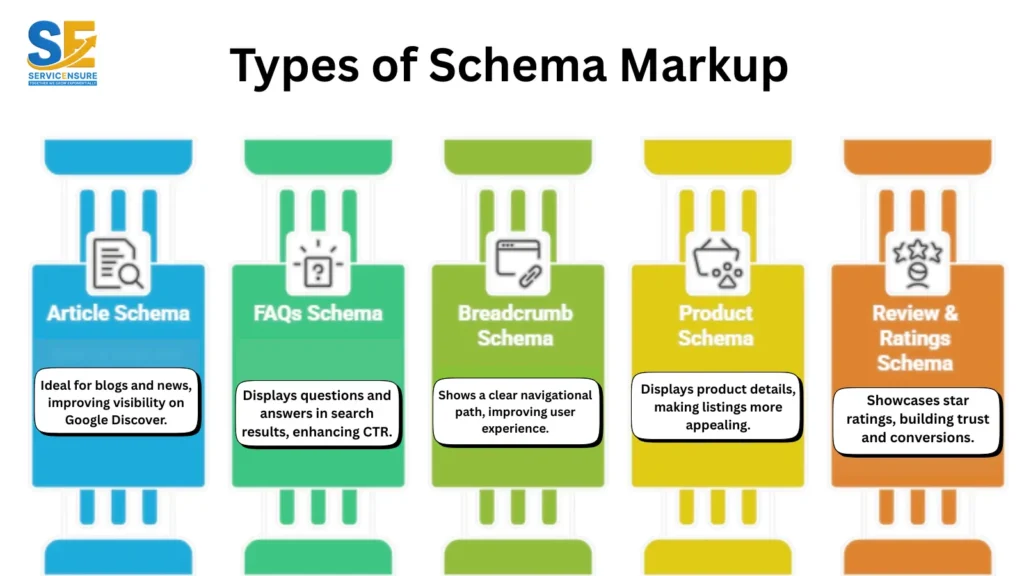
1. Article Schema
As the name of this schema suggests, this one is ideal for blogs, news, and informational content. By adding article schema, you will be able to help search engines identify the publish date, author, and headline. As a result, you will notice improvement in your website visibility on Google Discover as well as news-related searches.
2. FAQs Schema
This type of schema is to be added to pages that provide an answer to frequently asked questions by the user. Furthermore, the FAQs schema will also directly display the questions and answers in the search results. This will come under the “people also ask” section in the organic results. This can result in improving your website’s screen-to-space ratio along with CTR.
3. Breadcrumb Schema
This schema markup type shows a clear navigational path to your website in the search results. By adding this schema, you will be able to assist users in effectively locating your website. Moreover, the breadcrumb schema will also assist in improving the overall structure of your website, along with the overall user experience.
4. Product Schema
This is one of the most important schema types for local SEO as well as for eCommerce sites. Product schema will display your products’ pricing, availability, and all the other necessary details. By adding these types of schema markup, you will be able to make your listings more informative and appealing to all potential buyers.
5. Review & Ratings Schema
Review & ratings schema will showcase star ratings in the organic search results. This rating will help you build trust in the audience and encourage users to engage with your business. Once the user feels confident in engaging with your business, you will be able to improve the number of leads and conversions.

Step-By-Step Guide For How To Add Schema Markup
Learning how to add schema markup is the first step for ensuring that search engines are able to accurately understand and display your content. Below, we have shared a simple step-by-step process that you can follow to add schema markup to your website without raising any unnecessary complexities.
1. Choose The Right Schema Type
The first step in how to add schema markup starts by selecting the right type that matches your page’s intent. For example, if a page is for blogs, then add article schema, and if it is for eCommerce, then add product schema. By aligning schema markup with your page intent, you will not only be able to avoid eligibility issues but also ensure that search engines are able to effectively interpret the content.
2. Create Schema Markup
Once you have chosen a schema markup, the next step would be to actually create it. There are multiple methods of creating a schema markup, such as:
- Schema Markup Generators: Dedicated generators like Denstu’s Schema Markup Generator can help you quickly generate the code without any manual labor. Moreover, as the schema is generated by using JASON-LD, it offers you excellent flexibility and control.
- Manually: If you want complete control over the schema markup, then you can write the code manually. The most common format for manual schema markup is JASON-LD. It is a lightweight data format. You can simply place it inside a <script type=”application/ld+json”> tag in your HTML.
- WordPress Plugins: If you are running a WordPress-based website, then adding schema markup is actually a pretty straightforward task, as you only need to install a plugin. We recommend using the RankMath plugin for adding the schema markup, as it offers more flexibility as well as supports custom fields.
- ChatGPT: ChatGPT is one of the best generative AI tools in the market, and you can use it for creating a custom schema for your website just by entering a prompt, like “Create JSON-LD schema markup for a Product with name, price, rating, and availability.”
3. Add Schema Markup To Your Website
Once you have created your schema markup, you will need to correctly place it into your website for it to function. This can be done in two ways.
- Manually: Add the JSON-LD code directly to the <head> section or the footer of your page. Manual implementation is ideal for custom websites as it will give you complete control.
- CMS Plugins: This is more of a beginner-friendly method and works on platforms like WordPress and Shopify. If you are adding the schema through CMS plugins, then there will be no need for any manual coding. However, do note that this method is only suitable for small to medium-scale businesses.
If you are finding the task of adding schema markup to your website difficult, then it is recommended that you consult with an SEO service provider company. A reliable SEO company will effectively implement the schema on your website without raising any errors. Moreover, they will also assist your business to effectively rise in the organic rankings.
4. Validate and Test Schema
The steps listed above should have given you the answer to how to add schema markup. However, before publishing it, it is essential that you first validate it. This is essential because even a small mistake can very well may break how search engines read your structured data.
In order to check whether there are any errors with the schema markup or not, you can use a Google Schema Validator. The validator will help you ensure that your schema markup is compliant, functional, and is working effectively.
Contact us today and get a free audit of your website.
Strengthen Your Search Visibility With Structured Data
Schema markup is one of the most reliable yet underused SEO techniques that can help improve how your content appears in search results. By learning how to add schema markup, you will be able to ensure that the search engines are able to effectively and accurately understand your pages. This will lead to richer results, better visibility, and most importantly, higher clicks.
About How To Add Schema Markup (FAQs)
What is schema markup in AI?
It is a structured format of metadata that helps search engines as well as AI models to accurately interpret the content of your webpages.
Is schema markup necessary?
While adding schema markup is not mandatory, it can, nevertheless, offer great benefits by improving search appearance and clarity.
Can schema markup hurt my website?
Although schema markup cannot hurt your website, if you are using duplicate schema, then it can confuse the search engines. This can result in penalties for your website.
How long will it take to see results after adding schema markup?
The duration for results can vary, but you can expect rich results within a few days to a few weeks after proper implementation and validation.
What are the three main types of structured data?
The three main types of structured data include relational data, such as SQL databases; hierarchical data, such as XML documents; and tabular data, such as customer information in an Excel sheet.

Aadiv Atharv is a results-focused Digital Marketing Specialist with expertise in performance marketing, social media strategy, and conversion optimization. He excels at crafting creative, ROI-oriented campaigns that help brands connect with the right audience. His blend of creativity and technical skill makes him a powerful force in today’s competitive digital landscape.